> For the complete documentation index, see [llms.txt](https://recursos.demandu.tech/llms.txt). Markdown versions of documentation pages are available by appending `.md` to page URLs; this page is available as [Markdown](https://recursos.demandu.tech/crea-tu-primer-bot./crea-tu-chatbot-de-telegram.md).
# Crea tu Chatbot de Telegram
Para conectar Telegram con ***Demandu*** primero necesitamos crear el bot oficial dentro de Telegram. No te preocupes 😄 Telegram hace esto súper fácil usando una herramienta llamada ***BotFather***. Es el bot oficial para crear otros bots.
1. #### En la barra de búsqueda superior, escribe exactamente: @BotFather (Asegúrate de seleccionar el que tiene la palomita azul de verificado ✔️).
2. #### Dale clic al botón de Iniciar (***Start***) en la parte inferior del chat.
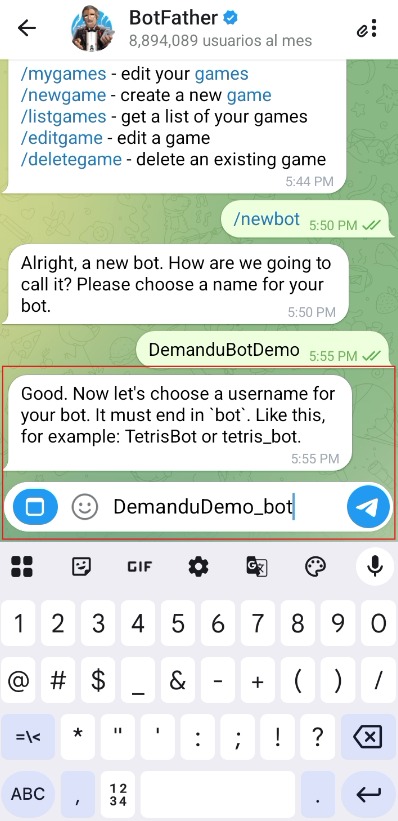
3. #### 🌟 Envía el comando mágico: /***newbot*** .
* #### 4. 📛 Bautizar a tu nuevo Asistente.
* 4.1 ***Nombre Público:*** Escribe el nombre que verán tus clientes (ejemplo: *Soporte Demandu o Mi Negocio Bot*). Presiona enviar.
* 4.2 ***Username (ID único)***: Ahora elige un nombre de usuario para buscarlo en Telegram. Condición obligatoria: Debe terminar obligatoriamente en la palabra `bot` o `_bot` (ejemplo: `DemanduSoporte_bot` o `PlataformaDemanduBot`).
#### 🔑 *5. Guardar el Token API (Tu Llave Maestra)*
Si todo salió bien, BotFather te enviará un mensaje de felicitación. 🥳
1. Dentro de ese mensaje, busca un código largo de letras y números conocido como HTTP API Token (se ve parecido a esto: `123456789:ABCdefGhIJKlmNo`).
2. Copia ese código por completo. 🪙 ¡Esta es la llave maestra que le permitirá a Demandu controlar el bot!
{% hint style="info" icon="lightbulb-on" %}
## [***Tip Demandu***: ¡Guarda este código! El *Token API* funciona como la *contraseña maestra* de tu bot. No lo compartas en canales públicos para evitar que personas ajenas controlen tus flujos de comunicación.](#user-content-fn-1)[^1]
{% endhint %}
6. #### Entra a tu plataforma Demandu y da "*clic*" en el botón "***Crear nuevo chatbot***".
7. #### Selecciona la opción "Telegram".
#### 8. Selecciona el objetivo comercial de tu bot.
8.1 Procede al siguiente paso
#### 9. Introduce el número de tu teléfono móvil de Telegram registrado y has "clic" en conectar.
#### 10. Recibirás un Código de inicio de sesión en tu cuenta de Telegram.
Introduce el ***código de inicio de sesión*** aquí y haz clic en "***Conecte manualmente su bot***"
{% hint style="info" icon="lightbulb-on" %}
***Tip Demandu***: Puede hacer clic en *`reenviar`* código en caso de que no lo haya recibido. Si aún no ha recibido el código de inicio de sesión, por favor verifica el número de móvil de Telegram y vuelve a introducirlo haciendo clic en *`Cambiar número`*.
{% endhint %}
#### 11. Conecta con tu cuenta existente de Telegram.
Ahora para conectar con una cuenta existente, debes proporcionar los mismos nombres que usaste al crear el bot usando ***@BotFather***, junto con el token generado en el paso 5.
## 🎉¡Felicidades! 🎉 ya esta todo listo para hacer tu bot de *Telegram* en ***Demandu***.
[^1]: